The configuration depends on the device. Example requirements and settings:
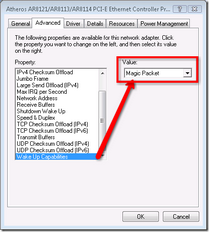
1.Wake On LAN requires an ATX power supply with at least 1 A at +5 VSB. 2.BIOS settings: on the Power (Management) or Advanced tab, turn on Wake On LAN. The option can have different names, for example: Wake On LAN, MAC Resume From S3/S4, MACPME Power Up Control, Power On By Onboard LAN, Power Up By Onboard LAN, Resume by LAN, Resume By WOL, Resume on LAN, Resume on LAN/PME#, Wake on LAN from S5, Wake Up On LAN, WakeUp by Onboard LAN or WOL (PME#) From Soft-Off. 3.Network card settings: •Go to the network card settings in Windows > Control Panel > Device Manager. •On the Power Management tab, set the options so that the device can wake the computer (option names depend on the network card, for example Allow this device to wake the computer). •On the Advanced tab, turn on wake-up and Wake On LAN. The options depend on the network card; example settings are shown below. 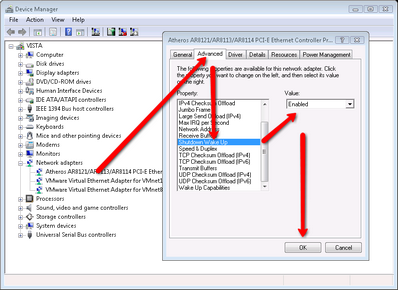
|


