|
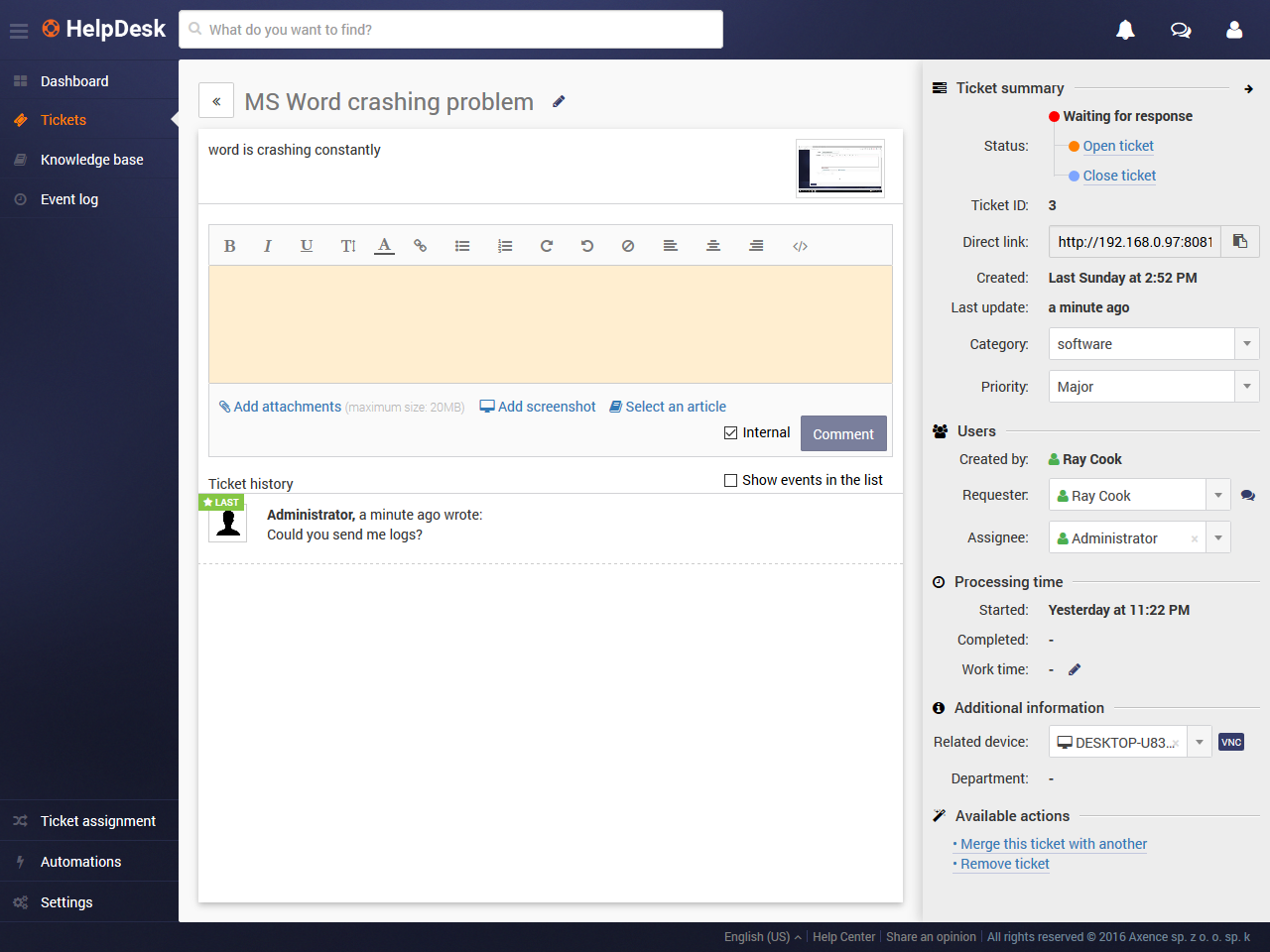
You will find the Details panel on the right side of the ticket processing window. The screenshot shows the panel in the Administrator view (a HelpDesk Employee cannot delete a ticket).
 Changing the status
To change the ticket status (see Tickets), click on the target status. The list shows all statuses to which you can change the ticket; the first one is the current status.
Important! Closing a ticket cannot be undone, and a closed ticket cannot be deleted from the system.
|
Changing the category
To change the ticket category (see Categories and folders), expand the category menu and select the category from the list.
|
Changing the priority
To change the ticket priority (see Priorities), expand the priority menu and select the priority from the list.
|
Users
Changing the requester and assignee
To change the requester manually, expand the Requester field and select the person from the list.
To assign the ticket to a HelpDesk Employee or Administrator, expand the Assignee field and select the person responsible for solving the ticket from the list.
You can also assign tickets automatically (see User management, Ticket assignment and Automations).
Adding observers
You can add people to the list of observers; they get e-mail notifications about new public comments in the ticket. Axence nVision® automatically adds the requester, the person solving the ticket and HelpDesk Employees who modified the ticket to this list.
Chat
To start a chat with the requester or assignee (see Chat), click on the icon on the right of the field with their name.
|
Other sections
The other sections are described in separate topics:
•Processing time (see Setting the ticket processing time) •Remote access (see Remote access) •Related tickets (see Related tickets) •Related assets (see Related assets) SLA metric – service level
The section shows the active and completed SLA metrics that cover the ticket (see SLA metrics), and information on when the metric will be violated.
|
Additional actions
In this section, you can:
•Merge the ticket with another one (see Merging tickets) •Delete the ticket (see Deleting a ticket) Related topics
•Starting the HelpDesk interface •Tickets
|