Starting the HelpDesk interface


|
Starting the HelpDesk interface |
|
|
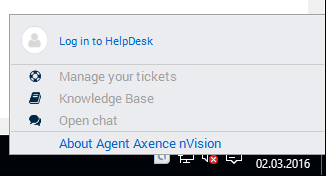
You can start the HelpDesk interface in several ways. In the nVision console Click on HelpDesk. The HelpDesk interface opens in the default browser. Through the Agent 1.Right-click on the Agent icon on the taskbar. The Agent menu opens. The options shown depend on the Agent settings; if there are no HelpDesk module options, turn on HelpDesk in the Agent settings (see Configuration).
2.Select Log in to HelpDesk. Directly in the browser Enter or paste the URL of the HelpDesk module in the browser, or click on a link, for example, one sent by e-mail. You will find the URL in the nVision console, in Main (ribbon) > Options, on the Service configuration tab.
Related topics |